In-Depth Review: Coast ‘EAL35R’ 1000-Lumen Voice-Controlled Lantern
In-Depth Review: Coast ‘EAL35R’ 1000-Lumen Voice-Controlled Lantern


I recently reviewed the Coast FL97R headlamp, a sub-$60 featured-laden headlamp with voice control. Did I really need voice control for something as simple as a headlamp?
The short answer was that it didn’t matter, because it’s a feature that Coast is building into their newer product lines without adding much of a cost premium. More importantly, it works and I actually liked it, like how I’m used to Alexa controlling all my lights at home.
Also, I just moved to Colorado so I haven’t gotten hunting or fishing yet, but I did lend the headlamp to my friend for one of his buck hunting trips, and he really liked it. This dude likes to keep things simple and hunts with a bow and arrow, so his endorsement is quite a surprise.

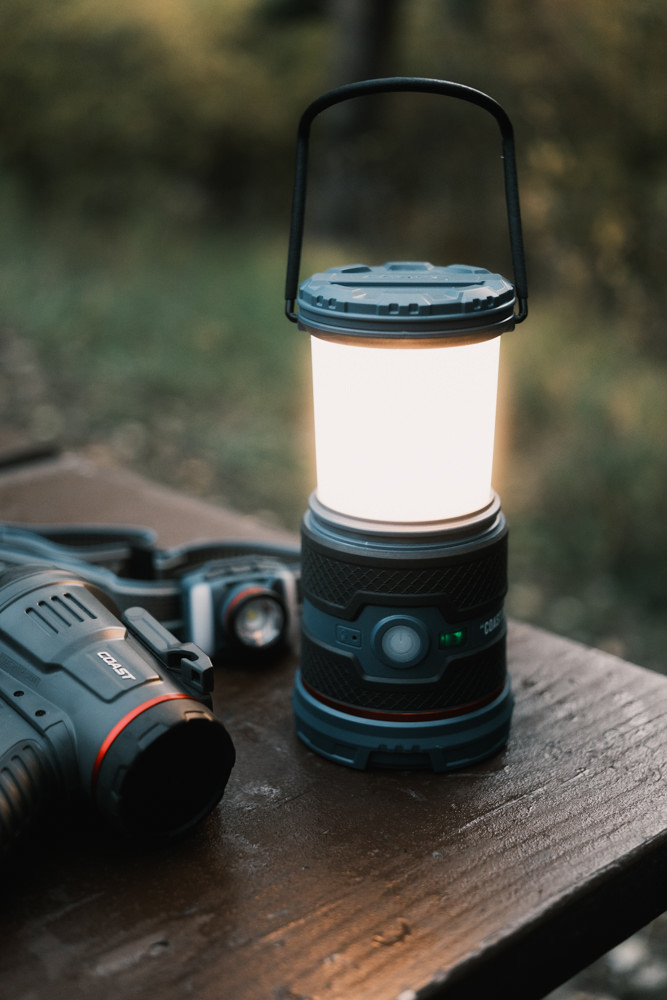
Coast’s EAL35R is an update to their $29 lightweight EAL30R lantern now with the voice control feature for an additional $10.
We used and reviewed the lantern in tandem with the FL97R headlamp for one of our camping trips, so I’ll dig into the specs and my experience using the lantern as well as a brief overview of the voice control feature and how we used it. If you want a full in-depth review of the voice control aspect, you can read the FL97R headlamp review, since it heavily focuses on that aspect and it’s more or less the same.
Quick Jump Links
- How Voice control Works
- Color Temp, Illumination, and Battery Life
- Power Bank and Rechargeable Battery
- Weather Protection
- Limitations
- Final Thoughts and Value Proposition
How The Voice Control Works On The Coast EAL35R
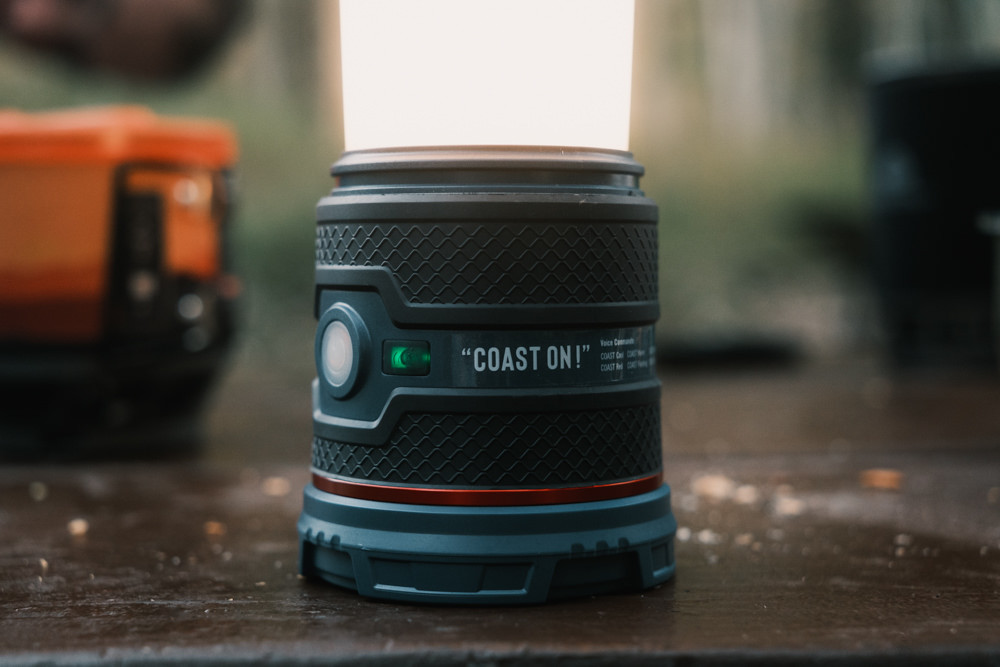
Like other Coast products with the voice control feature, there’s an activation button that turns on the ‘listening’ mode stays on for 15 minutes at a time before turning off from inactivity. It’s important to remember this, because I’ll get to it later as far as highlighting one of the device’s limitation.
The button is to the right of the large central power button. Once it’s on, indicated by a light, the lantern will listen via a mono-directional mic (to the left of the power button) for the trigger word ‘Coast’ followed one of the commands. In the case of the EAL35R, you have the following:
- On/Off
- Up/Down
- Maximum/Minimum
- Warm (Low, Medium, High)
- Cool (Low, Medium, High)
- White (Low, Medium, High)
- Red
- Flashing
It works pretty well. I’d say 95% accurate at catching when I say ‘Coast,’ but once in a while I’ll have to say it twice.
Color Temperature, Illumination, and Battery Life
The voice commands is pretty much covers all the different light modes you can activate on the EAL35R lantern.
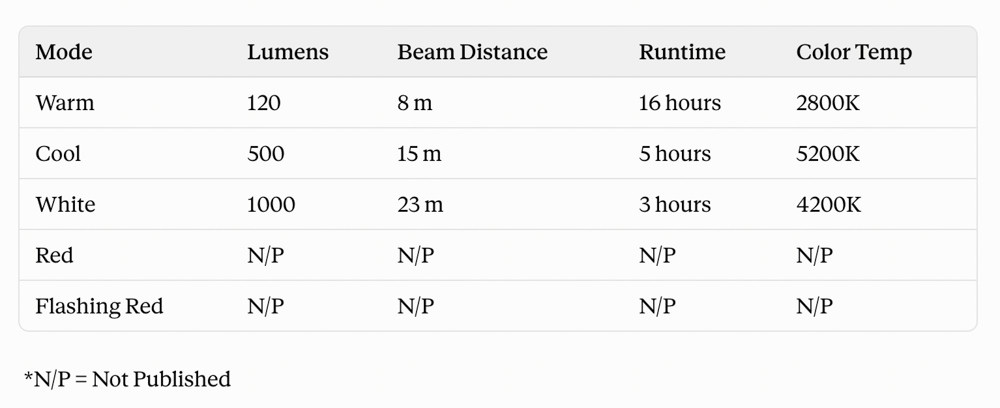
For testing purposes, I went through every iteration of the command. When you turn it on to each of the Warm/Cool/White modes with voice, the illumination is set to roughly ‘Medium’.
So, if you say ‘Coast Cool,’ for example, you can then use the ‘Up’ or ‘Down’ command to brighten or dim the light further by 20% increments. You can also use the ‘Maximum’ and ‘Minimum’ command to go to the highest and lowest brightness.
If you cycle through using the power button, you’ll start with ‘Medium Cool’, followed a ‘High White’ and ‘Low Warm.’
To get to the ‘Red’ mode, just hold the power button for a couple of seconds.
In practice, I found that I liked using ‘Warm’ on ‘Medium’ or ‘High’ most of the time, and ‘White’ at ‘Medium’ when I want to illuminate a whole area like a camping table.
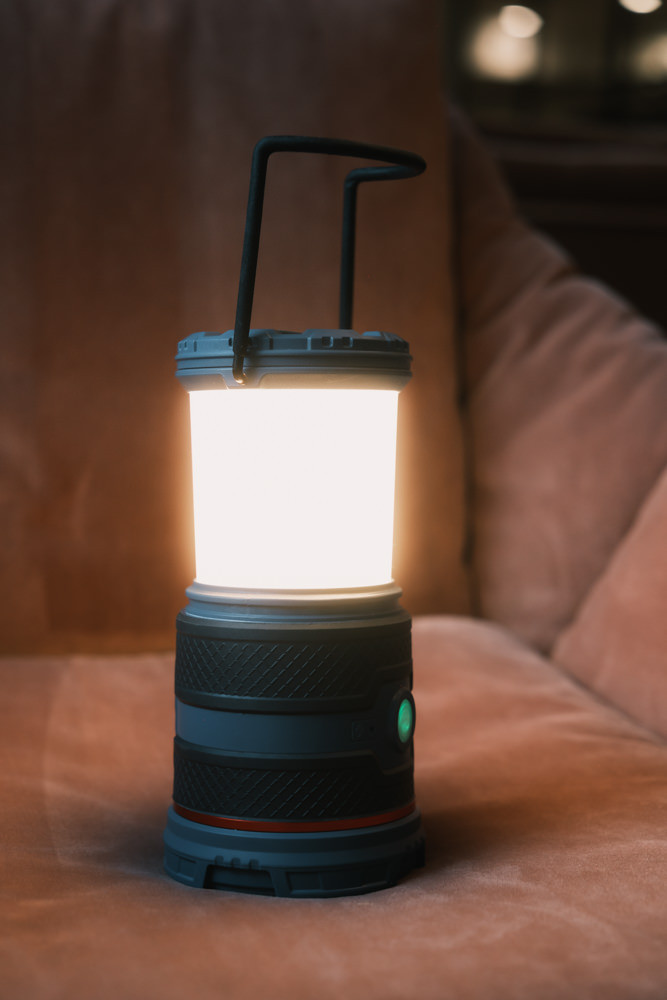
The ‘Cool’ appears brighter at ‘Medium’ than the ‘White.’
‘Red’ is nice for the inside a tent at night right before bed.
Power Bank and Rechargeable Battery
A neat feature of this lantern is that the 4,400 mAh rechargeable Zithion battery also functions as a power bank. On the backside of the lantern, there’s a rubber cover that protect separate USB-C In and Out ports.
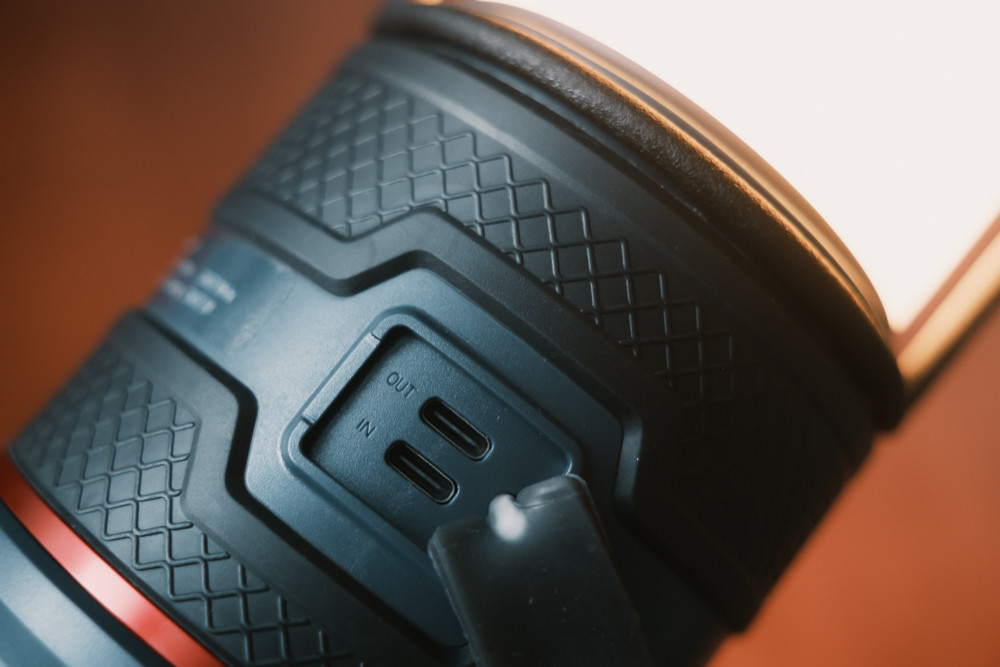
4,400 mAh is not a lot, so I wouldn’t rely on this to fully charge a newer iPhone 18 Pro, which has a 4,288 mAh battery itself, but it’s nice if you need a bit of juice and don’t have access to other power sources.
On the bottom, you can unscrew a plate to reveal a battery compartment where you can keep 4 x AA batteries for back-up power. The built-in rechargeable battery is the primary power source, so it won’t draw from the back-up batteries while there’s still a charge.
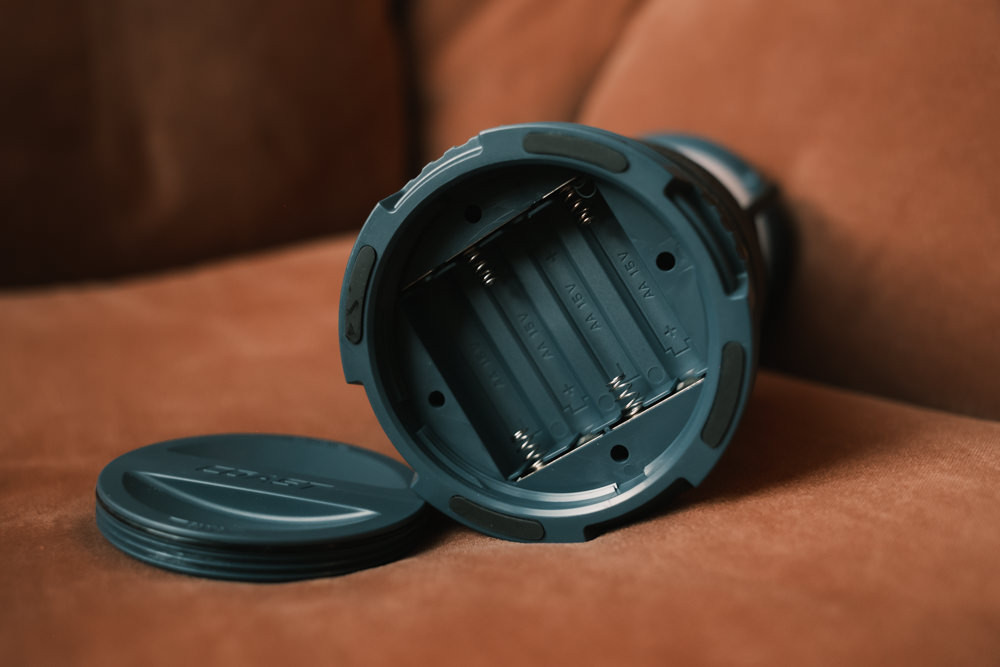
It’s worth it to note that the power bank function only works when there is still juice in the rechargeable battery. It does not work with the backup AA batteries.
Weather Protection
At 19.8 oz, the lantern is pretty solid but not too heavy. It feels durable and is rated IP54. Here’s what that means:
5 (dust): Dust-resistant. Some dust particles can get in, but it shouldn’t affect the functionality of the lantern.
4 (water): Water-resistant. There’s some protection of rain and splashes, but not submersion.
In other words, if it starts raining lightly, you should be fine. This happened to us and I just had to give the lantern a wipe. The moisture didn’t affect it at all, but just to be on the safe side, I made sure to keep the rubber cover on the charging ports closed and I wiped it down afterwards.
If there’s a downpour, it’ll probably survive, but I wouldn’t leave it sitting out for 30 minutes or anything like that in heavy rain.
Limitations on the EAL35R
Since we used it together with another Coast voice-control product, there’s no way for either device to know if a command is meant for it.
So, in practice, you might end up turning on or off multiple Coast devices at once if they each have the voice control function.
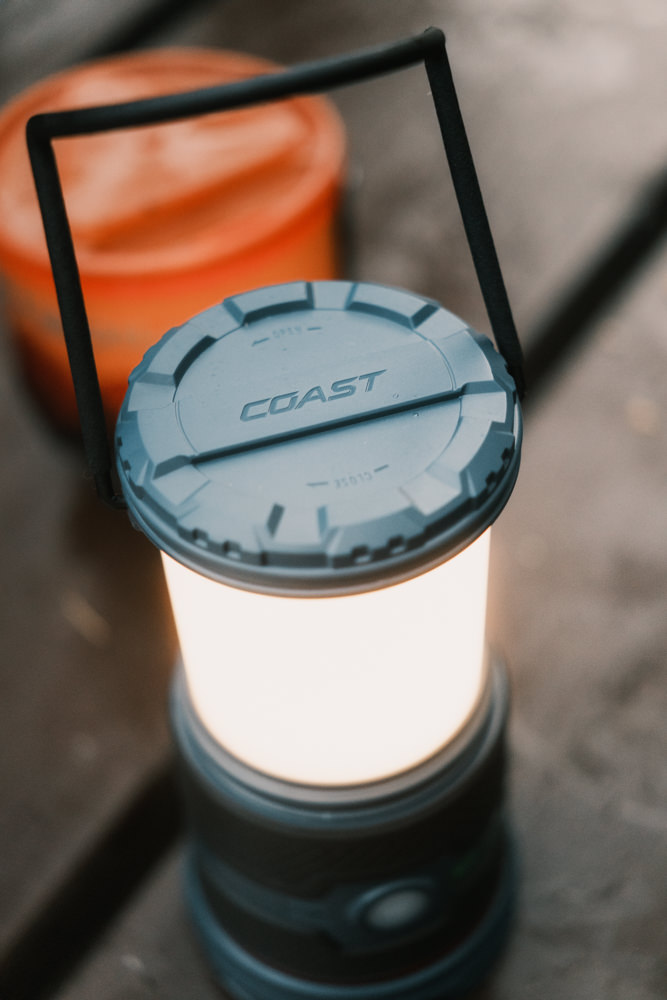
Where I found the device really useful was when we hung it up at the top of our tent at night. We really liked using the voice commands to change the light while we were shuffling around and getting ready for bed. I like to read a bit before sleeping, so I was able to dim the lights, turn it red, and eventually off.
It felt a little like being at home, since we heavily use Alexa to control things around the house.
What would have been nice for my partner was if the voice activation feature was always on. That way, she can whisper for the red lights to turn on in the middle of the night when she needed to pee.
In this case, she still find the lamp in the dark and feel for the on or voice button.
It’s a small inconvenience, but ONLY because we had this convenient feature in the first place.
In all my years of camping, I can say definitely that no one ever complained that they had to use their hands to turn on a light.
Value Factor and Final Thoughts
At $39 on Coast’s official site and REI, this is nice investment for a bright and dependable lamp with the neat voice control feature. You can also find certain colors discounted down to $32, which is a pretty good price for this type of lantern.
If you don’t need the voice control, the EAL30R is basically the non-voice version for $29 or even as low as $20.
For years, I used these pull-out lanterns that you can buy in a 4-pack for under $30. There are no color modes or adjustments. Just a simple bright 360 LED light. If you need less light, you don’t pull it out all the way, and they last for a long time on 3 AA batteries.
Alternatively, you can pick up a couple of these light pucks for around $20 each, though look for sales, cause I’ve seen them for around $13.
They are all viable solutions.
Personally, I like Coast as a company. Their products are well-made at a very affordable price-point when you compare it to other small businesses in the US.
I first came across them when someone gifted me one of their Damascus knives, since I enjoy collecting small pocket knives. I also have one of their Contra EDC knives that easily slips into a pocket whenever I’m in the outdoors. It’s a simple folding pocket knife with a frame lock, but it’s sturdy, sharp, and fits well in my hand.

They have a larger line-up, but my experience has been with their knives and lights. My recommendation is to get a high quality product, especially when they are on sale, and feel good knowing they’ll last for years. For outdoor gear, I also like to check to see if REI carries them, because that’s as good an endorsement as anything.
Updated on October 25, 2026